Showing posts with label Ansible. Show all posts

Tuesday, August 29, 2023

Run Ansible Playbook: Shell commands and Shell scripts

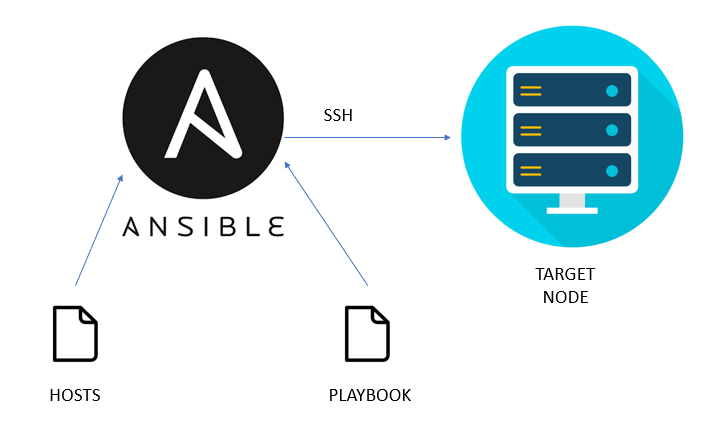
 Ansible 101 Getting Started. Ansible is an agentless automation that… | by  Winton Huang | Medium

Ansible Playbooks: Shell

Create a Yaml file with shell commands as follows

cat shell.yml
---
 - hosts: localhost

   tasks:
   - name: Execute shell command
     shell: |
       pwd
       ls
       df -h


   - name: Execute shell script
     shell: /home/ansible/Desktop/shell.sh 

How to run a playbook?

Execute following command to run a playbook in Ansible

ansible-playbook -v shell.yml
or
ansible-playbook -vvv shell.yml

ansible@ansible-VirtualBox:~/Desktop$ ansible-playbook -v shell.yml
No config file found; using defaults

PLAY [localhost] ******************************************************************************************************************************************************************************************

TASK [Gathering Facts] ************************************************************************************************************************************************************************************
ok: [localhost]

TASK [Execute shell command] ******************************************************************************************************************************************************************************
changed: [localhost] => {"changed": true, "cmd": "pwd\nls\ndf -h\n", "delta": "0:00:00.003099", "end": "2021-04-23 13:49:30.938095", "rc": 0, "start": "2021-04-23 13:49:30.934996", "stderr": "", "stderr_lines": [], "stdout": "/home/ansible/Desktop\ndocker.yml\nshell.sh\nshell.yml\nFilesystem      Size  Used Avail Use% Mounted on\ntmpfs           199M  1.4M  198M   1% /run\n/dev/sda3        31G  9.1G   21G  32% /\ntmpfs           992M  128K  992M   1% /dev/shm\ntmpfs           5.0M  4.0K  5.0M   1% /run/lock\ntmpfs           4.0M     0  4.0M   0% /sys/fs/cgroup\n/dev/sda2       512M  7.9M  505M   2% /boot/efi\ntmpfs           199M  104K  199M   1% /run/user/1000\n/dev/sr0         59M   59M     0 100% /media/ansible/VBox_GAs_6.1.18", "stdout_lines": ["/home/ansible/Desktop", "docker.yml", "shell.sh", "shell.yml", "Filesystem      Size  Used Avail Use% Mounted on", "tmpfs           199M  1.4M  198M   1% /run", "/dev/sda3        31G  9.1G   21G  32% /", "tmpfs           992M  128K  992M   1% /dev/shm", "tmpfs           5.0M  4.0K  5.0M   1% /run/lock", "tmpfs           4.0M     0  4.0M   0% /sys/fs/cgroup", "/dev/sda2       512M  7.9M  505M   2% /boot/efi", "tmpfs           199M  104K  199M   1% /run/user/1000", "/dev/sr0         59M   59M     0 100% /media/ansible/VBox_GAs_6.1.18"]}

TASK [Execute shell script] *******************************************************************************************************************************************************************************
changed: [localhost] => {"changed": true, "cmd": "/home/ansible/Desktop/shell.sh", "delta": "0:00:00.002609", "end": "2021-04-23 13:49:31.076033", "rc": 0, "start": "2021-04-23 13:49:31.073424", "stderr": "", "stderr_lines": [], "stdout": "Running a Ansible Playbook", "stdout_lines": ["Running a Ansible Playbook"]}

PLAY RECAP ************************************************************************************************************************************************************************************************
localhost                  : ok=3    changed=2    unreachable=0    failed=0    skipped=0    rescued=0    ignored=0  


The other command output is as follows

ansible@ansible-VirtualBox:~/Desktop$ ansible-playbook -vvv shell.yml
ansible-playbook 2.10.8
  config file = None
  configured module search path = ['/home/ansible/.ansible/plugins/modules', '/usr/share/ansible/plugins/modules']
  ansible python module location = /usr/local/lib/python3.8/dist-packages/ansible
  executable location = /usr/local/bin/ansible-playbook
  python version = 3.8.6 (default, Jan 27 2021, 15:42:20) [GCC 10.2.0]
No config file found; using defaults
host_list declined parsing /etc/ansible/hosts as it did not pass its verify_file() method
script declined parsing /etc/ansible/hosts as it did not pass its verify_file() method
auto declined parsing /etc/ansible/hosts as it did not pass its verify_file() method
Parsed /etc/ansible/hosts inventory source with ini plugin
Skipping callback 'default', as we already have a stdout callback.
Skipping callback 'minimal', as we already have a stdout callback.
Skipping callback 'oneline', as we already have a stdout callback.

PLAYBOOK: shell.yml ***************************************************************************************************************************************************************************************
1 plays in shell.yml

PLAY [localhost] ******************************************************************************************************************************************************************************************

TASK [Gathering Facts] ************************************************************************************************************************************************************************************
task path: /home/ansible/Desktop/shell.yml:2
<localhost> ESTABLISH LOCAL CONNECTION FOR USER: ansible
<localhost> EXEC /bin/sh -c 'echo ~ansible && sleep 0'
<localhost> EXEC /bin/sh -c '( umask 77 && mkdir -p "` echo /home/ansible/.ansible/tmp `"&& mkdir "` echo /home/ansible/.ansible/tmp/ansible-tmp-1619165993.756536-4014-251215842015888 `" && echo ansible-tmp-1619165993.756536-4014-251215842015888="` echo /home/ansible/.ansible/tmp/ansible-tmp-1619165993.756536-4014-251215842015888 `" ) && sleep 0'
<localhost> Attempting python interpreter discovery
<localhost> EXEC /bin/sh -c 'echo PLATFORM; uname; echo FOUND; command -v '"'"'/usr/bin/python'"'"'; command -v '"'"'python3.7'"'"'; command -v '"'"'python3.6'"'"'; command -v '"'"'python3.5'"'"'; command -v '"'"'python2.7'"'"'; command -v '"'"'python2.6'"'"'; command -v '"'"'/usr/libexec/platform-python'"'"'; command -v '"'"'/usr/bin/python3'"'"'; command -v '"'"'python'"'"'; echo ENDFOUND && sleep 0'
<localhost> EXEC /bin/sh -c '/usr/bin/python3 && sleep 0'
Using module file /usr/local/lib/python3.8/dist-packages/ansible/modules/setup.py
<localhost> PUT /home/ansible/.ansible/tmp/ansible-local-4010hi_z_3cp/tmpoo7k3m55 TO /home/ansible/.ansible/tmp/ansible-tmp-1619165993.756536-4014-251215842015888/AnsiballZ_setup.py
<localhost> EXEC /bin/sh -c 'chmod u+x /home/ansible/.ansible/tmp/ansible-tmp-1619165993.756536-4014-251215842015888/ /home/ansible/.ansible/tmp/ansible-tmp-1619165993.756536-4014-251215842015888/AnsiballZ_setup.py && sleep 0'
<localhost> EXEC /bin/sh -c '/usr/bin/python3 /home/ansible/.ansible/tmp/ansible-tmp-1619165993.756536-4014-251215842015888/AnsiballZ_setup.py && sleep 0'
<localhost> EXEC /bin/sh -c 'rm -f -r /home/ansible/.ansible/tmp/ansible-tmp-1619165993.756536-4014-251215842015888/ > /dev/null 2>&1 && sleep 0'
ok: [localhost]
META: ran handlers

TASK [Execute shell command] ******************************************************************************************************************************************************************************
task path: /home/ansible/Desktop/shell.yml:5
<localhost> ESTABLISH LOCAL CONNECTION FOR USER: ansible
<localhost> EXEC /bin/sh -c 'echo ~ansible && sleep 0'
<localhost> EXEC /bin/sh -c '( umask 77 && mkdir -p "` echo /home/ansible/.ansible/tmp `"&& mkdir "` echo /home/ansible/.ansible/tmp/ansible-tmp-1619165994.531177-4083-230473977652675 `" && echo ansible-tmp-1619165994.531177-4083-230473977652675="` echo /home/ansible/.ansible/tmp/ansible-tmp-1619165994.531177-4083-230473977652675 `" ) && sleep 0'
Using module file /usr/local/lib/python3.8/dist-packages/ansible/modules/command.py
<localhost> PUT /home/ansible/.ansible/tmp/ansible-local-4010hi_z_3cp/tmpy6c7des_ TO /home/ansible/.ansible/tmp/ansible-tmp-1619165994.531177-4083-230473977652675/AnsiballZ_command.py
<localhost> EXEC /bin/sh -c 'chmod u+x /home/ansible/.ansible/tmp/ansible-tmp-1619165994.531177-4083-230473977652675/ /home/ansible/.ansible/tmp/ansible-tmp-1619165994.531177-4083-230473977652675/AnsiballZ_command.py && sleep 0'
<localhost> EXEC /bin/sh -c '/usr/bin/python3 /home/ansible/.ansible/tmp/ansible-tmp-1619165994.531177-4083-230473977652675/AnsiballZ_command.py && sleep 0'
<localhost> EXEC /bin/sh -c 'rm -f -r /home/ansible/.ansible/tmp/ansible-tmp-1619165994.531177-4083-230473977652675/ > /dev/null 2>&1 && sleep 0'
changed: [localhost] => {
    "changed": true,
    "cmd": "pwd\nls\ndf -h\n",
    "delta": "0:00:00.003387",
    "end": "2021-04-23 13:49:54.788373",
    "invocation": {
        "module_args": {
            "_raw_params": "pwd\nls\ndf -h\n",
            "_uses_shell": true,
            "argv": null,
            "chdir": null,
            "creates": null,
            "executable": null,
            "removes": null,
            "stdin": null,
            "stdin_add_newline": true,
            "strip_empty_ends": true,
            "warn": true
        }
    },
    "rc": 0,
    "start": "2021-04-23 13:49:54.784986",
    "stderr": "",
    "stderr_lines": [],
    "stdout": "/home/ansible/Desktop\ndocker.yml\nshell.sh\nshell.yml\nFilesystem      Size  Used Avail Use% Mounted on\ntmpfs           199M  1.4M  198M   1% /run\n/dev/sda3        31G  9.1G   21G  32% /\ntmpfs           992M  128K  992M   1% /dev/shm\ntmpfs           5.0M  4.0K  5.0M   1% /run/lock\ntmpfs           4.0M     0  4.0M   0% /sys/fs/cgroup\n/dev/sda2       512M  7.9M  505M   2% /boot/efi\ntmpfs           199M  104K  199M   1% /run/user/1000\n/dev/sr0         59M   59M     0 100% /media/ansible/VBox_GAs_6.1.18",
    "stdout_lines": [
        "/home/ansible/Desktop",
        "docker.yml",
        "shell.sh",
        "shell.yml",
        "Filesystem      Size  Used Avail Use% Mounted on",
        "tmpfs           199M  1.4M  198M   1% /run",
        "/dev/sda3        31G  9.1G   21G  32% /",
        "tmpfs           992M  128K  992M   1% /dev/shm",
        "tmpfs           5.0M  4.0K  5.0M   1% /run/lock",
        "tmpfs           4.0M     0  4.0M   0% /sys/fs/cgroup",
        "/dev/sda2       512M  7.9M  505M   2% /boot/efi",
        "tmpfs           199M  104K  199M   1% /run/user/1000",
        "/dev/sr0         59M   59M     0 100% /media/ansible/VBox_GAs_6.1.18"

    ]
}

TASK [Execute shell script] *******************************************************************************************************************************************************************************
task path: /home/ansible/Desktop/shell.yml:11
<localhost> ESTABLISH LOCAL CONNECTION FOR USER: ansible
<localhost> EXEC /bin/sh -c 'echo ~ansible && sleep 0'
<localhost> EXEC /bin/sh -c '( umask 77 && mkdir -p "` echo /home/ansible/.ansible/tmp `"&& mkdir "` echo /home/ansible/.ansible/tmp/ansible-tmp-1619165994.8185554-4113-157803549902887 `" && echo ansible-tmp-1619165994.8185554-4113-157803549902887="` echo /home/ansible/.ansible/tmp/ansible-tmp-1619165994.8185554-4113-157803549902887 `" ) && sleep 0'
Using module file /usr/local/lib/python3.8/dist-packages/ansible/modules/command.py
<localhost> PUT /home/ansible/.ansible/tmp/ansible-local-4010hi_z_3cp/tmpx_72yvf1 TO /home/ansible/.ansible/tmp/ansible-tmp-1619165994.8185554-4113-157803549902887/AnsiballZ_command.py
<localhost> EXEC /bin/sh -c 'chmod u+x /home/ansible/.ansible/tmp/ansible-tmp-1619165994.8185554-4113-157803549902887/ /home/ansible/.ansible/tmp/ansible-tmp-1619165994.8185554-4113-157803549902887/AnsiballZ_command.py && sleep 0'
<localhost> EXEC /bin/sh -c '/usr/bin/python3 /home/ansible/.ansible/tmp/ansible-tmp-1619165994.8185554-4113-157803549902887/AnsiballZ_command.py && sleep 0'
<localhost> EXEC /bin/sh -c 'rm -f -r /home/ansible/.ansible/tmp/ansible-tmp-1619165994.8185554-4113-157803549902887/ > /dev/null 2>&1 && sleep 0'
changed: [localhost] => {
    "changed": true,
    "cmd": "/home/ansible/Desktop/shell.sh",
    "delta": "0:00:00.002630",
    "end": "2021-04-23 13:49:54.970375",
    "invocation": {
        "module_args": {
            "_raw_params": "/home/ansible/Desktop/shell.sh",
            "_uses_shell": true,
            "argv": null,
            "chdir": null,
            "creates": null,
            "executable": null,
            "removes": null,
            "stdin": null,
            "stdin_add_newline": true,
            "strip_empty_ends": true,
            "warn": true
        }
    },
    "rc": 0,
    "start": "2021-04-23 13:49:54.967745",
    "stderr": "",
    "stderr_lines": [],
    "stdout": "Running a Ansible Playbook",
    "stdout_lines": [
        "Running a Ansible Playbook"
    ]
}
META: ran handlers
META: ran handlers

PLAY RECAP ************************************************************************************************************************************************************************************************
localhost                  : ok=3    changed=2    unreachable=0    failed=0    skipped=0    rescued=0    ignored=0  

ansible@ansible-VirtualBox:~/Desktop$
 

Check the following link to find more information on shell executable in Ansible -> https://docs.ansible.com/ansible/latest/collections/ansible/builtin/shell_module.html


Format Output in Ansible


 Ansible

To properly format the ouput of the ansible playbook output

Create a ansible.cfg as follows and add the following content

/etc/ansible/ansible.cfg

[defaults]
# Use the YMAL callback plugin
stdout_callback = yaml
# Use the stdout_callback when running ad-hoc commands
bin_ansible_callbacks = True
interpreter_python = auto_silent

Execute the playbook and you will see the formatted output as follows

ansible@ansible-VirtualBox:~/Desktop$ ansible-playbook shell.yml -v
Using /etc/ansible/ansible.cfg as config file

PLAY [localhost] ******************************************************************************************************************************************************************************************

TASK [Gathering Facts] ************************************************************************************************************************************************************************************
ok: [localhost]

TASK [Execute shell command] ******************************************************************************************************************************************************************************
changed: [localhost] => changed=true
  cmd: |-
    pwd
    ls
    df -h
  delta: '0:00:00.007618'
  end: '2021-04-23 20:52:56.904928'
  rc: 0
  start: '2021-04-23 20:52:56.897310'
  stderr: ''
  stderr_lines: <omitted>
  stdout: |-
    /home/ansible/Desktop
    docker.yml
    pip.yml
    shell.sh
    shell.yml
    Filesystem      Size  Used Avail Use% Mounted on
    tmpfs           199M  1.4M  198M   1% /run
    /dev/sda3        31G  9.7G   20G  34% /
    tmpfs           992M  128K  992M   1% /dev/shm
    tmpfs           5.0M  4.0K  5.0M   1% /run/lock
    tmpfs           4.0M     0  4.0M   0% /sys/fs/cgroup
    /dev/sda2       512M  7.9M  505M   2% /boot/efi
    tmpfs           199M  104K  199M   1% /run/user/1000
    /dev/sr0         59M   59M     0 100% /media/ansible/VBox_GAs_6.1.18
  stdout_lines: <omitted>

TASK [Execute shell script] *******************************************************************************************************************************************************************************
changed: [localhost] => changed=true
  cmd: /home/ansible/Desktop/shell.sh
  delta: '0:00:00.008033'
  end: '2021-04-23 20:52:57.244745'
  rc: 0
  start: '2021-04-23 20:52:57.236712'
  stderr: ''
  stderr_lines: <omitted>
  stdout: |-
    Running a Ansible Playbook
    Friday 23 April 2021 08:52:57 PM IST
    7
  stdout_lines: <omitted>

PLAY RECAP ************************************************************************************************************************************************************************************************
localhost                  : ok=3    changed=2    unreachable=0    failed=0    skipped=0    rescued=0    ignored=0  

ansible@ansible-VirtualBox:~/Desktop$

Install Docker using Ansible Playbook

  DevOps. Ansible and Docker | JazzTeam Software Development Company

Ansible 

Create a docker.yml with below content

- hosts: localhost
  become: yes
  become_method: sudo
  become_flags: -s
  become_user: root

  tasks:
   - name: Install docker
     shell: |
      sudo apt-get update
      sudo apt-get install \
        apt-transport-https \
        ca-certificates \
        curl \
        gnupg \
        lsb-release
      curl -fsSL https://download.docker.com/linux/ubuntu/gpg | sudo gpg --dearmor -o /usr/share/keyrings/docker-archive-keyring.gpg
      echo \
      "deb [arch=amd64 signed-by=/usr/share/keyrings/docker-archive-keyring.gpg] https://download.docker.com/linux/ubuntu \
      $(lsb_release -cs) stable" | sudo tee /etc/apt/sources.list.d/docker.list > /dev/null
      sudo apt-get update
      yes | sudo apt-get install docker-ce docker-ce-cli containerd.io
      sudo docker run hello-world

ansible@ansible-VirtualBox:~/Desktop$ ansible-playbook docker.yml -v
Using /etc/ansible/ansible.cfg as config file

PLAY [localhost] ******************************************************************************************************************************************************************************************

TASK [Gathering Facts] ************************************************************************************************************************************************************************************
ok: [localhost]

TASK [Install docker] *************************************************************************************************************************************************************************************
File '/usr/share/keyrings/docker-archive-keyring.gpg' exists. Overwrite? (y/N) y
[WARNING]: Consider using 'become', 'become_method', and 'become_user' rather than running sudo
fatal: [localhost]: FAILED! => changed=true
  cmd: |-
    sudo apt-get update
    sudo apt-get install  apt-transport-https  ca-certificates  curl  gnupg  lsb-release
    curl -fsSL https://download.docker.com/linux/ubuntu/gpg | sudo gpg --dearmor -o /usr/share/keyrings/docker-archive-keyring.gpg
    echo "deb [arch=amd64 signed-by=/usr/share/keyrings/docker-archive-keyring.gpg] https://download.docker.com/linux/ubuntu \
    $(lsb_release -cs) stable" | sudo tee /etc/apt/sources.list.d/docker.list > /dev/null
    sudo apt-get update
    yes | sudo apt-get install docker-ce docker-ce-cli containerd.io
    sudo docker run hello-world
  delta: '0:00:58.673958'
  end: '2021-04-23 21:45:50.452396'
  msg: non-zero return code
  rc: 125
  start: '2021-04-23 21:44:51.778438'
  stderr: |-
    E: Sub-process /usr/bin/dpkg returned an error code (1)
    docker: Cannot connect to the Docker daemon at unix:///var/run/docker.sock. Is the docker daemon running?.
    See 'docker run --help'.
  stderr_lines: <omitted>
  stdout: |-
    Hit:1 https://download.docker.com/linux/ubuntu groovy InRelease
    Get:2 http://security.ubuntu.com/ubuntu groovy-security InRelease [110 kB]
    Hit:3 http://in.archive.ubuntu.com/ubuntu groovy InRelease
    Hit:4 http://in.archive.ubuntu.com/ubuntu groovy-updates InRelease
    Hit:5 http://in.archive.ubuntu.com/ubuntu groovy-backports InRelease
    Fetched 110 kB in 17s (6,602 B/s)
    Reading package lists...
    Reading package lists...
    Building dependency tree...
    Reading state information...
    lsb-release is already the newest version (11.1.0ubuntu2).
    lsb-release set to manually installed.
    curl is already the newest version (7.68.0-1ubuntu4.3).
    The following packages were automatically installed and are no longer required:
      docker-ce-rootless-extras docker-scan-plugin libslirp0 pigz slirp4netns
    Use 'sudo apt autoremove' to remove them.
    The following additional packages will be installed:
      dirmngr gnupg-l10n gnupg-utils gpg gpg-agent gpg-wks-client gpg-wks-server
      gpgconf gpgsm gpgv
    Suggested packages:
      tor parcimonie xloadimage scdaemon
    The following NEW packages will be installed:
      apt-transport-https
    The following packages will be upgraded:
      ca-certificates dirmngr gnupg gnupg-l10n gnupg-utils gpg gpg-agent
      gpg-wks-client gpg-wks-server gpgconf gpgsm gpgv
    12 upgraded, 1 newly installed, 0 to remove and 239 not upgraded.
    Need to get 2,586 kB/2,733 kB of archives.
    After this operation, 214 kB of additional disk space will be used.
    Do you want to continue? [Y/n] Abort.
    Hit:1 https://download.docker.com/linux/ubuntu groovy InRelease
    Hit:2 http://in.archive.ubuntu.com/ubuntu groovy InRelease
    Hit:3 http://in.archive.ubuntu.com/ubuntu groovy-updates InRelease
    Get:4 http://security.ubuntu.com/ubuntu groovy-security InRelease [110 kB]
    Hit:5 http://in.archive.ubuntu.com/ubuntu groovy-backports InRelease
    Fetched 110 kB in 17s (6,496 B/s)
    Reading package lists...
    Reading package lists...
    Building dependency tree...
    Reading state information...
    Suggested packages:
      aufs-tools cgroupfs-mount | cgroup-lite
    The following NEW packages will be installed:
      containerd.io docker-ce docker-ce-cli
    0 upgraded, 3 newly installed, 0 to remove and 251 not upgraded.
    Need to get 0 B/94.5 MB of archives.
    After this operation, 425 MB of additional disk space will be used.
    Selecting previously unselected package containerd.io.
    (Reading database ... (Reading database ... 5%(Reading database ... 10%(Reading database ... 15%(Reading database ... 20%(Reading database ... 25%(Reading database ... 30%(Reading database ... 35%(Reading database ... 40%(Reading database ... 45%(Reading database ... 50%(Reading database ... 55%(Reading database ... 60%(Reading database ... 65%(Reading database ... 70%(Reading database ... 75%(Reading database ... 80%(Reading database ... 85%(Reading database ... 90%(Reading database ... 95%(Reading database ... 100%(Reading database ... 191898 files and directories currently installed.)
    Preparing to unpack .../containerd.io_1.4.4-1_amd64.deb ...
    Unpacking containerd.io (1.4.4-1) ...
    Selecting previously unselected package docker-ce-cli.
    Preparing to unpack .../docker-ce-cli_5%3a20.10.6~3-0~ubuntu-groovy_amd64.deb ...
    Unpacking docker-ce-cli (5:20.10.6~3-0~ubuntu-groovy) ...
    Selecting previously unselected package docker-ce.
    Preparing to unpack .../docker-ce_5%3a20.10.6~3-0~ubuntu-groovy_amd64.deb ...
    Unpacking docker-ce (5:20.10.6~3-0~ubuntu-groovy) ...
    Setting up containerd.io (1.4.4-1) ...
    Created symlink /etc/systemd/system/multi-user.target.wants/containerd.service → /lib/systemd/system/containerd.service.
    Setting up docker-ce-cli (5:20.10.6~3-0~ubuntu-groovy) ...
    Setting up docker-ce (5:20.10.6~3-0~ubuntu-groovy) ...
    Created symlink /etc/systemd/system/multi-user.target.wants/docker.service → /lib/systemd/system/docker.service.
    Created symlink /etc/systemd/system/sockets.target.wants/docker.socket → /lib/systemd/system/docker.socket.
    Job for docker.service failed because the control process exited with error code.
    See "systemctl status docker.service" and "journalctl -xe" for details.
    invoke-rc.d: initscript docker, action "start" failed.
    ● docker.service - Docker Application Container Engine
         Loaded: loaded (]8;;file://ansible-VirtualBox/lib/systemd/system/docker.service/lib/systemd/system/docker.service]8;;; enabled; vendor preset: enabled)
         Active: activating (auto-restart) (Result: exit-code) since Fri 2021-04-23 21:45:41 IST; 4ms ago
    TriggeredBy: [0;1;32m●[0m docker.socket
           Docs: ]8;;https://docs.docker.comhttps://docs.docker.com]8;;
        Process: 13286 ExecStart=/usr/bin/dockerd -H fd:// --containerd=/run/containerd/containerd.sock [0;1;31m(code=exited, status=1/FAILURE)[0m
       Main PID: 13286 (code=exited, status=1/FAILURE)
 
    Apr 23 21:45:41 ansible-VirtualBox systemd[1]: [0;1;39m[0;1;31m[0;1;39mdocker.service: Main process exited, code=exited, status=1/FAILURE[0m
    Apr 23 21:45:41 ansible-VirtualBox systemd[1]: [0;1;38;5;185m[0;1;39m[0;1;38;5;185mdocker.service: Failed with result 'exit-code'.[0m
    Apr 23 21:45:41 ansible-VirtualBox systemd[1]: [0;1;31m[0;1;39m[0;1;31mFailed to start Docker Application Container Engine.[0m
    dpkg: error processing package docker-ce (--configure):
     installed docker-ce package post-installation script subprocess returned error exit status 1

    Processing triggers for man-db (2.9.3-2) ...
    Processing triggers for systemd (246.6-1ubuntu1) ...
    Errors were encountered while processing:
     docker-ce
  stdout_lines: <omitted>

PLAY RECAP ************************************************************************************************************************************************************************************************
localhost                  : ok=1    changed=0    unreachable=0    failed=1    skipped=0    rescued=0    ignored=0  

Just re-ran the same playbook and docker installation completed successfully

ansible@ansible-VirtualBox:~/Desktop$ ansible-playbook docker.yml -v
Using /etc/ansible/ansible.cfg as config file

PLAY [localhost] ******************************************************************************************************************************************************************************************

TASK [Gathering Facts] ************************************************************************************************************************************************************************************
ok: [localhost]

TASK [Install docker] *************************************************************************************************************************************************************************************
File '/usr/share/keyrings/docker-archive-keyring.gpg' exists. Overwrite? (y/N) y
[WARNING]: Consider using 'become', 'become_method', and 'become_user' rather than running sudo
changed: [localhost] => changed=true
  cmd: |-
    sudo apt-get update
    sudo apt-get install  apt-transport-https  ca-certificates  curl  gnupg  lsb-release
    curl -fsSL https://download.docker.com/linux/ubuntu/gpg | sudo gpg --dearmor -o /usr/share/keyrings/docker-archive-keyring.gpg
    echo "deb [arch=amd64 signed-by=/usr/share/keyrings/docker-archive-keyring.gpg] https://download.docker.com/linux/ubuntu \
    $(lsb_release -cs) stable" | sudo tee /etc/apt/sources.list.d/docker.list > /dev/null
    sudo apt-get update
    yes | sudo apt-get install docker-ce docker-ce-cli containerd.io
    sudo docker run hello-world
  delta: '0:00:19.867569'
  end: '2021-04-23 21:46:42.643464'
  rc: 0
  start: '2021-04-23 21:46:22.775895'
  stderr: ''
  stderr_lines: <omitted>
  stdout: |-
    Get:1 http://security.ubuntu.com/ubuntu groovy-security InRelease [110 kB]
    Hit:2 http://in.archive.ubuntu.com/ubuntu groovy InRelease
    Hit:3 http://in.archive.ubuntu.com/ubuntu groovy-updates InRelease
    Hit:4 http://in.archive.ubuntu.com/ubuntu groovy-backports InRelease
    Hit:5 https://download.docker.com/linux/ubuntu groovy InRelease
    Fetched 110 kB in 6s (18.9 kB/s)
    Reading package lists...
    Reading package lists...
    Building dependency tree...
    Reading state information...
    lsb-release is already the newest version (11.1.0ubuntu2).
    lsb-release set to manually installed.
    curl is already the newest version (7.68.0-1ubuntu4.3).
    The following additional packages will be installed:
      dirmngr gnupg-l10n gnupg-utils gpg gpg-agent gpg-wks-client gpg-wks-server
      gpgconf gpgsm gpgv
    Suggested packages:
      tor parcimonie xloadimage scdaemon
    The following NEW packages will be installed:
      apt-transport-https
    The following packages will be upgraded:
      ca-certificates dirmngr gnupg gnupg-l10n gnupg-utils gpg gpg-agent
      gpg-wks-client gpg-wks-server gpgconf gpgsm gpgv
    12 upgraded, 1 newly installed, 0 to remove and 239 not upgraded.
    1 not fully installed or removed.
    Need to get 2,586 kB/2,733 kB of archives.
    After this operation, 214 kB of additional disk space will be used.
    Do you want to continue? [Y/n] Abort.
    Hit:1 https://download.docker.com/linux/ubuntu groovy InRelease
    Hit:2 http://in.archive.ubuntu.com/ubuntu groovy InRelease
    Get:3 http://security.ubuntu.com/ubuntu groovy-security InRelease [110 kB]
    Hit:4 http://in.archive.ubuntu.com/ubuntu groovy-updates InRelease
    Hit:5 http://in.archive.ubuntu.com/ubuntu groovy-backports InRelease
    Fetched 110 kB in 1s (78.0 kB/s)
    Reading package lists...
    Reading package lists...
    Building dependency tree...
    Reading state information...
    containerd.io is already the newest version (1.4.4-1).
    docker-ce-cli is already the newest version (5:20.10.6~3-0~ubuntu-groovy).
    docker-ce is already the newest version (5:20.10.6~3-0~ubuntu-groovy).
    0 upgraded, 0 newly installed, 0 to remove and 251 not upgraded.
    1 not fully installed or removed.
    After this operation, 0 B of additional disk space will be used.
    Do you want to continue? [Y/n] Setting up docker-ce (5:20.10.6~3-0~ubuntu-groovy) ...
 
    Hello from Docker!
    This message shows that your installation appears to be working correctly.
 
    To generate this message, Docker took the following steps:
     1. The Docker client contacted the Docker daemon.
     2. The Docker daemon pulled the "hello-world" image from the Docker Hub.
        (amd64)
     3. The Docker daemon created a new container from that image which runs the
        executable that produces the output you are currently reading.
     4. The Docker daemon streamed that output to the Docker client, which sent it
        to your terminal.
 
    To try something more ambitious, you can run an Ubuntu container with:
     $ docker run -it ubuntu bash
 
    Share images, automate workflows, and more with a free Docker ID:
     https://hub.docker.com/
 
    For more examples and ideas, visit:
     https://docs.docker.com/get-started/
  stdout_lines: <omitted>

PLAY RECAP ************************************************************************************************************************************************************************************************
localhost                  : ok=2    changed=1    unreachable=0    failed=0    skipped=0    rescued=0    ignored=0  

ansible@ansible-VirtualBox:~/Desktop$ sudo docker create busybox ping google.com
1b6968752edb96b23b14315e6a557421d48878c97e3e308a1c11a32ca1fa7c9e
ansible@ansible-VirtualBox:~/Desktop$ sudo docker start 1b6968752edb96b23b14315e6a557421d48878c97e3e308a1c11a32ca1fa7c9e
1b6968752edb96b23b14315e6a557421d48878c97e3e308a1c11a32ca1fa7c9e
ansible@ansible-VirtualBox:~/Desktop$ sudo docker ps -all
CONTAINER ID   IMAGE     COMMAND             CREATED          STATUS         PORTS     NAMES
1b6968752edb   busybox   "ping google.com"   20 seconds ago   Up 6 seconds             cool_grothendieck

Install Apache using Ansible

  Installing Apache in Remote hosts Using Ansible Playbook.

Ansible 

Create a yaml file as follows

cat apache.yml
---
 - hosts: localhost
   become: yes
   become_method: sudo
   become_flags: -s
   become_user: root
   tasks:
   - name: Install Apache
     apt:
       name: apache2
       state: present
       update_cache: true 

or

Syntax 2:

cat apache_1.yml
---
 - hosts: localhost
   become: yes
   become_method: sudo
   become_flags: -s
   become_user: root
   tasks:
   - name: Install Apache
     apt: name=apache2 state=present update_cache=yes
 

and run the apache.yml playbook

ansible@ansible-VirtualBox:~/Desktop$ ansible-playbook -v apache.yml
Using /etc/ansible/ansible.cfg as config file

PLAY [localhost] ******************************************************************************************************************************************************************************************

TASK [Gathering Facts] ************************************************************************************************************************************************************************************
ok: [localhost]

TASK [Install Apache] *************************************************************************************************************************************************************************************
changed: [localhost] => changed=true
  cache_update_time: 1619332181
  cache_updated: true
  stderr: ''
  stderr_lines: <omitted>
  stdout: |-
    Reading package lists...
    Building dependency tree...
    Reading state information...
    Suggested packages:
      apache2-doc apache2-suexec-pristine | apache2-suexec-custom
    The following NEW packages will be installed:
      apache2
    0 upgraded, 1 newly installed, 0 to remove and 251 not upgraded.
    Need to get 0 B/95.6 kB of archives.
    After this operation, 542 kB of additional disk space will be used.
    Selecting previously unselected package apache2.
    (Reading database ... (Reading database ... 5%(Reading database ... 10%(Reading database ... 15%(Reading database ... 20%(Reading database ... 25%(Reading database ... 30%(Reading database ... 35%(Reading database ... 40%(Reading database ... 45%(Reading database ... 50%(Reading database ... 55%(Reading database ... 60%(Reading database ... 65%(Reading database ... 70%(Reading database ... 75%(Reading database ... 80%(Reading database ... 85%(Reading database ... 90%(Reading database ... 95%(Reading database ... 100%(Reading database ... 271653 files and directories currently installed.)
    Preparing to unpack .../apache2_2.4.46-1ubuntu1_amd64.deb ...
    Unpacking apache2 (2.4.46-1ubuntu1) ...
    Setting up apache2 (2.4.46-1ubuntu1) ...
    Enabling module mpm_event.
    Enabling module authz_core.
    Enabling module authz_host.
    Enabling module authn_core.
    Enabling module auth_basic.
    Enabling module access_compat.
    Enabling module authn_file.
    Enabling module authz_user.
    Enabling module alias.
    Enabling module dir.
    Enabling module autoindex.
    Enabling module env.
    Enabling module mime.
    Enabling module negotiation.
    Enabling module setenvif.
    Enabling module filter.
    Enabling module deflate.
    Enabling module status.
    Enabling module reqtimeout.
    Enabling conf charset.
    Enabling conf localized-error-pages.
    Enabling conf other-vhosts-access-log.
    Enabling conf security.
    Enabling conf serve-cgi-bin.
    Enabling site 000-default.
    Created symlink /etc/systemd/system/multi-user.target.wants/apache2.service -> /lib/systemd/system/apache2.service.
    Created symlink /etc/systemd/system/multi-user.target.wants/apache-htcacheclean.service -> /lib/systemd/system/apache-htcacheclean.service.
    Processing triggers for systemd (246.6-1ubuntu1) ...
    Processing triggers for man-db (2.9.3-2) ...
    Processing triggers for ufw (0.36-7) ...
  stdout_lines: <omitted>

PLAY RECAP ************************************************************************************************************************************************************************************************
localhost                  : ok=2    changed=1    unreachable=0    failed=0    skipped=0    rescued=0    ignored=0  

ansible@ansible-VirtualBox:~/Desktop$ ps -ef |grep apache
root        7629       1  0 11:59 ?        00:00:00 /usr/sbin/apache2 -k start
www-data    7631    7629  0 11:59 ?        00:00:00 /usr/sbin/apache2 -k start
www-data    7632    7629  0 11:59 ?        00:00:00 /usr/sbin/apache2 -k start
ansible     9021    1754  0 12:00 pts/0    00:00:00 grep --color=auto apache


Check the host on which Apache is running by using hostname - I command and then launch a browser and connect to the IP addresses mentioned

ansible@ansible-VirtualBox:~/Desktop$ hostname -I
10.0.2.15 172.17.0.1 

Launched the first IP and have set the following page in the index.html


you can check the status of apache service

ansible@ansible-VirtualBox:~/Desktop$ ps -ef|grep apache
root         639       1  0 10:52 ?        00:00:00 /usr/sbin/apache2 -k start
www-data     640     639  0 10:52 ?        00:00:00 /usr/sbin/apache2 -k start
www-data     641     639  0 10:52 ?        00:00:00 /usr/sbin/apache2 -k start
ansible     4361    1754  0 11:33 pts/0    00:00:00 grep --color=auto apache

You can configure your own page by following the below link

https://ubuntu.com/tutorials/install-and-configure-apache#1-overview

For now I'll set the apache index.html back 

Go to /var/www/html and rename the current index.html and move the original one back into the place

ansible@ansible-VirtualBox:/var/www/html$ ls
index.html  index.html_bak_24Apr21
ansible@ansible-VirtualBox:/var/www/html$ sudo mv index.html index.html_25Apr21
ansible@ansible-VirtualBox:/var/www/html$ sudo mv index.html_bak_24Apr21 index.html

Restart the services:

ansible@ansible-VirtualBox:/var/www/html$ systemctl reload apache2

Relaunch the IPs in the browser and you will see the original apache page

For port configuration, refer to: https://www.scaleway.com/en/docs/how-to-install-apache-on-ansible/